Parent AI Playbook · 1-Year Membership

Vet AI tools, set clear homework rules, and raise an independent thinker.

The complete Parent AI Playbook: vet tools by age, set anti-cheating homework rules, and build real thinking habits at home.

$29 paid once for one year. No auto-renewal. 7-day refunds.

Unlocks all in-depth parent guides, the Prompt Vault, printable family agreements, and bonus guided family AI projects.

Not ready to buy yet? Start with our free 30-second AI Tool Matchmaker and 94+ age & privacy reviews — no account needed.

Try the 30-second AI Tool Matchmaker first — free
Want to read free previews first? Browse the Parent Guide Library →

Every in-depth guide includes an open preview, and the 94+ tool directory stays free for every family.

1. Vet AI tools by age & privacy

Check age gates, account rules, and red flags before your child clicks

In-depth playbooks + printable tool scorecard

2. Anti-cheating homework rules

Set clear rules so AI coaches thinking instead of writing answers

Family scripts + 1-page homework agreement

3. Build real thinking habits

220 prompts + 10 thinking habits & scripts when AI gets things wrong

Prompt Vault + AI mistake response card

What stays free. What membership adds.

No purchase needed

  • 30-second AI Tool Matchmaker & 94+ age/privacy tool profiles.
  • All public safety articles, free guide previews, and starter family activities (AI Spot-the-Mistake, Dream House & basic Blocks).

Parent AI Playbook adds

$29 once · 365 days · No automatic renewal

  • Every in-depth parent playbook in full — vetting tools by age, anti-cheating homework rules, first-session scripts, and handling AI mistakes (plus guides published during your year).
  • The Parent’s Prompt Vault (220 prompts + 10 thinking habits) and the 10-sheet Printable Pack (homework agreement, tool scorecard, AI mistake card), saveable as PDF.
  • 4 downloadable parent AI skills, plus bonus perks: guided family AI projects, Weeks 2–12 of Blocks at Home, and member AI Magic Build (fair-use limits apply).

Start right after checkout: set your family homework agreement, run your first guided AI session, or print the tool scorecard.

Bonus Blocks Magic allowances and saving your builds

Member Magic: no personal daily limit; fair-use and the site-wide daily limit still apply.

Free Magic: 3 successful generations per network per day; ready-made shelf matches do not count.

Local saves: 12 free / 20 with membership. Builds stay in this browser; clearing browser data can remove them.

The Prompt Vault and the Printable Pack are written in English.

What one payment of $29 unlocks today

  • Every in-depth parent playbook in full — vetting tools by age, anti-cheating homework rules, first-session scripts, and what to say when AI gets something wrong — plus guides published during your year.
  • The Parent’s Prompt Vault: 220 prompts by age, subject and real-life scenario, plus 10 thinking habits. Print or save a PDF copy to keep.
  • The Printable Pack: 10 one-page sheets, including the homework agreement, the tool scorecard and the card for when AI says something wrong.
  • 4 parent member skills to download: a homework agreement, an AI mistake response, a first session and a tool evaluation.
  • Bonus family activities: guided family AI projects, Weeks 2–12 of Blocks at Home, and Unlimited AI Magic Build in Blocks for your year (fair-use limits apply).

Before you pay — no surprises

  • One payment · 365 days of full access · no auto-renewal · nothing to cancel
  • Price in USD. Local tax is added at checkout where it applies — about 10% in Japan, 20% in the UK, up to 25% in the EU, none in most of the US. You see the final total on the Creem page before you confirm.
  • Checkout is handled by Creem — pay by card or Alipay.
  • No account or password. After payment you land on your membership page: tap Unlock to switch on your guides & Playbook in this browser, and save your Prompt Vault & Printable Pack PDFs (you can also open the same emailed link on your child’s device for optional Blocks perks). Lost it? Recover it with your purchase email.
  • Not satisfied? Reply to your receipt email within 7 days of purchase and we will refund the full amount you paid. A person handles the refund. This does not affect your rights under your local consumer law.
  • In family projects, you run the chat AI with your own account; your child does not chat with the AI directly.

Questions before you buy? Email support@kidsaitools.com.

Already bought? Recover your purchase

Family AI Operating System · 4-Module Parent Playbook

Inside the $29 Parent AI Playbook Curriculum

The public tool directory and free articles stay free for everyone. One payment of $29 for the annual Playbook (12 months access, no auto-renewal) organizes our shipped parent materials into four practical steps: 26 canonical parent guides, 16 additional depth articles, 10 printable checklists, 4 parent-child AI skills, and the Prompt Vault (220 prompts + 10 thinking habits = 230 total items).

  1. Step 1

    Module 1: 10-Minute Tool Vetting, Age Gates & Privacy Setup

    Screen any AI app before your child uses it, keep accounts under a parent login, and configure privacy and training settings first.

  2. Step 2

    Module 2: Anti-Cheating Homework Co-Pilot System

    Put teacher rules and your child’s own first attempt ahead of the prompt box, and set up chatbots to ask guiding questions instead of writing work to hand in.

  3. Step 3

    Module 3: Age-Calibrated Prompting & Critical Thinking Habits (Ages 6–8, 9–11, 12–14+)

    Run your child’s first guided session and build age-appropriate questioning habits backed by 220 prompts + 10 thinking habits (230 total items).

  4. Step 4

    Module 4: Printable Family Rules, Screen Balance & AI Companion Boundaries

    Keep one-page agreements on the desk or fridge, respond calmly when AI gets facts wrong, and draw clear boundaries around AI companion chat apps.

Look Inside Before You Buy

Inspect 3 Real Playbook Excerpts Before Paying $29

12 months access · no auto-renewal

Sample Printable Rule Card: 3 Family Homework AI Rules

  1. Teacher’s rule and your own rough try come first: Check what this assignment allows before opening AI (if unclear, ask first), and try your own first step on paper before prompting.
  2. Coach, never ghostwriter: Never hand in AI-written text or ask it to “make my draft sound better.” When permitted, use AI to explain a concept, quiz you before a test, or point out what is unclear.
  3. Shared table + closed-screen check: Use a parent-managed account in a shared family space, then close the screen and explain your steps in your own words (checks understanding; check teacher rules and facts separately).

Unlocks immediately with the one-time $29 annual Playbook: all 10 one-page printable checklists and family agreements (print or save as PDF to keep).

Also included

Created by Felix, a parent with more than ten years in AI education.

For parents of children ages 5–12.

The parent operates the AI. Follow each tool’s current age rules and check the guide’s age range before trying an activity.

Also included: 16 in-depth articles in English on tool reviews and family decisions.

4 guided routines for your own AI: evaluate a tool, run a first session, agree on homework rules, and respond when AI says something wrong.

Start with these three guides

About 36 minutes of reading — not a setup or task-completion time.

  1. The Parent's Operating Manual for Raising a Kid With AI · 13 min read
  2. Your Child's First AI Session: A Minute-by-Minute Script · 11 min read
  3. The Family AI Setup: 30 Minutes to Make Your Account Kid-Ready · 12 min read

Read the free previews first. Membership opens the full guides.

$29one payment · one year
  • Every in-depth guide in full — the practical playbooks: how to run a first AI session with your child, what to actually say when the AI gets something wrong, how to pick tools by age, and tool guides with practical ways to use them together.
  • Guides published during your year open automatically, at no extra cost.
  • The Parent’s Prompt Vault — 220 prompts by age, subject and real-life scenario, each with a why-it-works note, plus the guardrail guide and 10 thinking-habits prompts. Print it or save it as a PDF during your year; the copy you save stays with you.
  • The Printable Pack — ten one-page sheets to print and fill in: the homework agreement, the tool scorecard, the project planners, and the card for when the AI says something wrong.
  • Unlimited AI Magic Build in Blocks during your membership year, subject to per-minute and shared daily fair-use limits.
  • Everything free stays free: the 7-Day AI Camp, the 3D Blocks builder, the tool directory and the whole article archive that brought you here. Membership adds the deep material; it never takes anything away.
  • Unlimited AI Magic Build in Blocks — plus 12 creator materials & 20 save slots

29 guides in the library today. New ones are included while you're a member.

29 guides in English

The Prompt Vault and the Printable Pack are written in English.

The Prompt Vault is included in membership for one year.

One payment · 365 days of full access · no auto-renewal · nothing to cancel

Price in USD. Local tax is added at checkout where it applies — about 10% in Japan, 20% in the UK, up to 25% in the EU, none in most of the US.

Not satisfied? Reply to your receipt email within 7 days of purchase and we will refund the full amount you paid. A person handles the refund. This does not affect your rights under your local consumer law.

After payment, use the unlock link sent to your email to activate reading on this device. If it's missing, check spam or recover it with your purchase email.

Equivalent to $2.42 per month over 365 days — paid once, today.

Included: The Parent's Prompt Vault · The Parent's Printable Pack

Try a free homework starting sheet

Read and use this example without an account or email address.

See the free starting sheet

Before AI Helps With Homework

A starting sheet for a parent and child to use together. Follow the teacher’s instructions for the specific assignment. If those instructions are unclear, ask before using AI.

1. Check the assignment

What does the teacher allow for this task?

☐ AI is not allowed. We will do this task without it.

☐ Some uses are allowed. Write which ones on paper: ____________________

☐ We are unsure. Our question for the teacher is: ____________________

2. Start with the child’s own attempt

Before opening an AI tool, ask: “What have you tried? Where are you stuck?”

The next step we will try ourselves: ____________________

3. Choose only the help that is allowed

If this assignment permits it, AI might explain a concept, suggest a practice question, or respond to a draft the child wrote. Do not assume those uses are allowed in every class.

The help we chose: ____________________

We will not enter names, school details, personal photos, or other private information. Use fictional examples when possible. An adult should check the tool’s current age and privacy requirements.

4. Check the work and describe the process

Ask: “Can you explain this in your own words?” That checks understanding; it does not prove who did the work or whether the AI use was allowed.

Check these separately:

☐ The work follows this assignment’s rules.

☐ The child can explain the reasoning and what they did themselves.

☐ Facts and sources have been checked where needed.

☐ Any required acknowledgement of AI use has been included.

If one is unclear, pause and ask the teacher before submitting.

Fill this sheet in on paper. KidsAiTools does not ask you to upload it.

Open the print-friendly sheet

What could one small activity look like?

Start with a small build, choose one detail to keep or change, and talk about it together. These are KidsAiTools demonstration images, not children’s work or evidence of learning. There is no need to copy them.

Week 2: Choose a tower top

KidsAiTools demonstration: A short blue tower with a yellow flat top.
Starting example: A short blue tower with a yellow flat top.
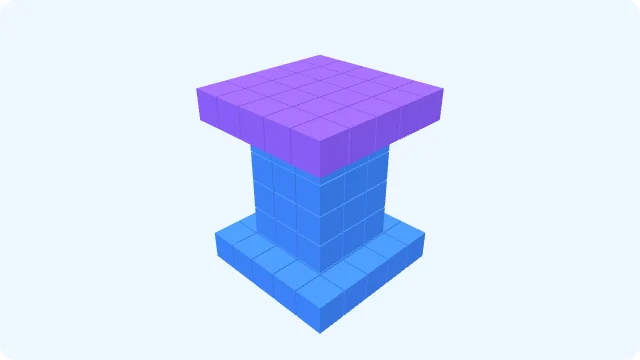
KidsAiTools demonstration: Keep the tower and change its top to purple.
One possible change: Keep the tower and change its top to purple.

A question to ask: “Which detail would you keep, or what one thing would you change?”

Preview this week’s activity →

Week 3: A tree in three colors

KidsAiTools demonstration: A brown trunk with green and yellow branch areas.
Starting example: A brown trunk with green and yellow branch areas.
KidsAiTools demonstration: Keep the three colors and shorten the yellow branch.
One possible change: Keep the three colors and shorten the yellow branch.

A question to ask: “Which color would you choose for each part?”

Preview this week’s activity →

Week 4: A rainbow gateway

KidsAiTools demonstration: Red and blue sides with a yellow top and an open passage.
Starting example: Red and blue sides with a yellow top and an open passage.
KidsAiTools demonstration: Move the blue side outward to make a wider opening.
One possible change: Move the blue side outward to make a wider opening.

A question to ask: “Where would a pretend visitor pass through, and how would you shape the opening?”

Preview this week’s activity →

Week 1 is free. The existing membership includes the full activity instructions for Weeks 2–12. Weeks 2–4 also include three-step activity cards, parent prompts, and smaller and stretch options. These images only illustrate possible choices.

Try Week 1 free first →

Blocks at Home · Build together

For 12 consecutive weeks, automatically receive a 20-minute Blocks family challenge every Friday; all 12 weeks are also available anytime on the website. Each includes 3 lines to read aloud, a building goal and 2 “tell me about it” questions.

Get week 1 free first

See Blocks at Home

In the library right now

Every guide has a free preview — read before you decide.

Homework & School

Safety & When Something Goes Wrong

Start Here

Weekend Projects

Planning the Year

You just scrolled the whole library. One payment opens all of it.

Questions

Is this a subscription? Will I be auto-charged?
No and no. One payment, 365 days of full access. When the year ends, you decide whether to renew.
How often do you publish?
We do not promise a fixed publishing day. This is a library that keeps growing plus a year of access to it — a cadence promise is not something we can guarantee, so we do not make one.
Does membership change anything for my child?
Your child gets unlimited AI Magic Build in Blocks, subject to per-minute and shared daily fair-use limits. In the browser your child uses for Blocks, open your membership delivery page and select Unlock AI Magic, 12 weekly challenges and member guides; this also turns on Magic in Blocks. The other kids’ tools and the camp stay free, with their existing daily limits.
Can I get a refund?
Not satisfied? Reply to your receipt email within 7 days of purchase and we will refund the full amount you paid. A person processes the refund through Creem. After 7 days, if you have a problem, reply to your receipt email and a person will review it. This does not affect your rights under your local consumer law.
What happens when the year ends?
In-depth guides return to preview mode and the unlock link stops working. Anything you printed or saved as a PDF during the year stays with you.

Already a member? Activate reading on this device